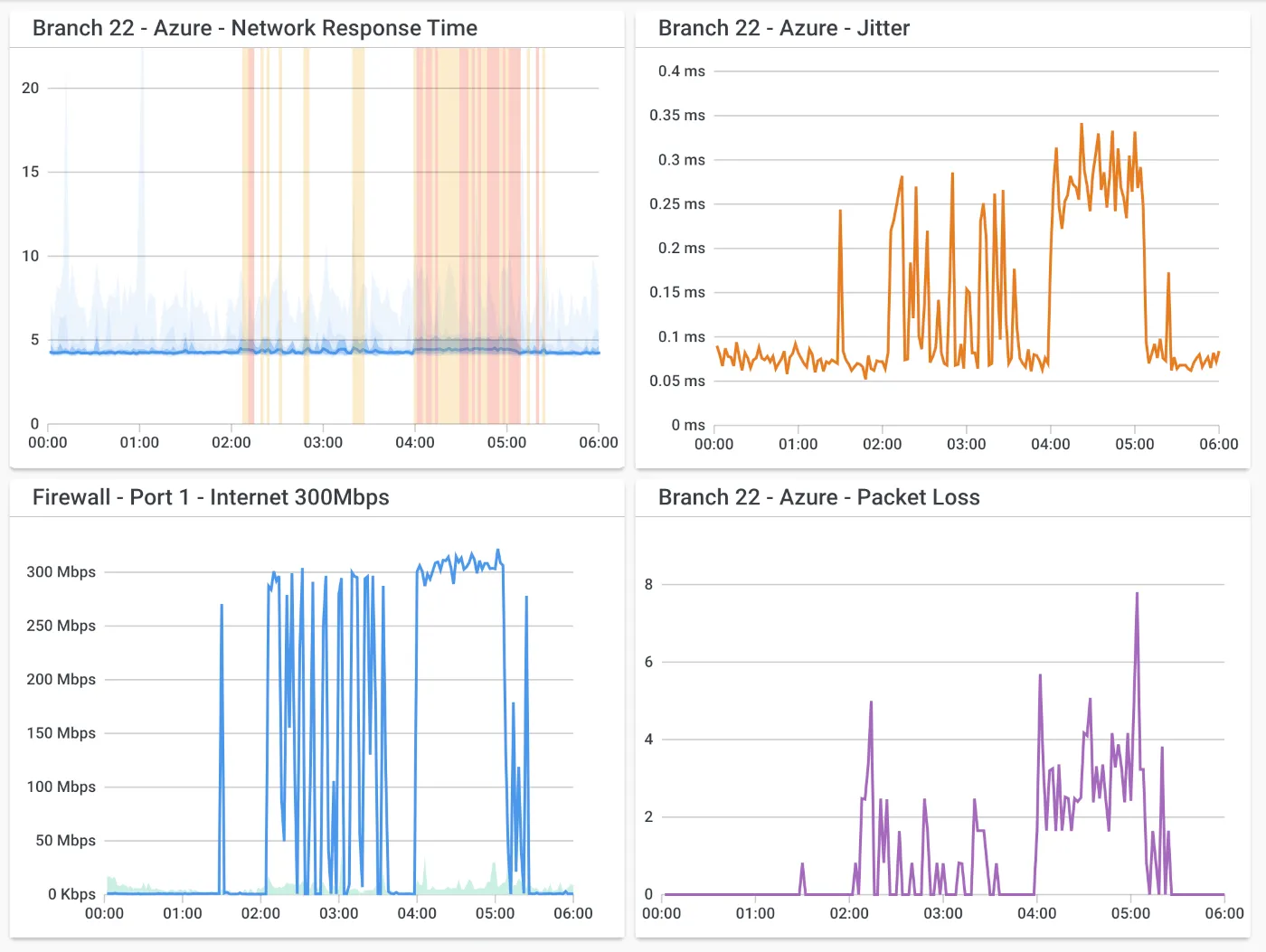
Six branch offices, two data centers, a Microsoft 365 tenant and an SD-WAN overlay from a provider that swears everything is green. When the Leeds office says Teams calls are choppy, you need to know whether the problem lives on Leeds’s local link, in the provider’s core, or on the path to Microsoft — and you need data from before the complaint arrived. That is the multi-site, always-on scenario Obkio is designed around.
What Obkio does
Obkio is a commercial, cloud-managed network performance monitoring service. The core idea is synthetic traffic between agents. You deploy monitoring agents at each location — as a software agent on Windows or Linux, a Docker container, a virtual appliance on Hyper-V, VMware or VirtualBox, or a small hardware agent the vendor sells — and Obkio also runs public monitoring agents in cloud regions. Agents exchange small test packets with one another continuously; the vendor states the interval is every 500 milliseconds. From that stream the platform computes latency, jitter, packet loss and a VoIP-style MOS score for each agent pair, in each direction.
On top of the mesh sit several additional features:
- Visual traceroutes that run automatically between agents, so when a pair degrades you can see how the path looked at that moment and whether it changed.
- SNMP device monitoring, polling firewalls, routers, switches and access points; the vendor advertises a 30-second polling interval on higher plans.
- Application checks against HTTP URLs, to see whether a SaaS front end is responding the way users would experience it.
- Alerting by email on entry plans, with webhooks, Slack and Microsoft Teams on higher ones.
Where it’s strong: continuous, directional evidence
Because agents sit at both ends of a link, Obkio can tell you which direction is suffering. Asymmetric loss — clean upstream, lossy downstream — is common on consumer-grade broadband and cable circuits, and ICMP-based tools running from one end have a hard time showing it. A graph that says “loss from HQ to Leeds 3%, Leeds to HQ 0%, since 09:40 on Tuesday” is precise, and that precision shortens provider escalations.
The history also matters. Since traffic flows day and night, the data for the incident is already there when the ticket lands. Premium plans keep 36 months of history according to the pricing page, long enough to compare this quarter with the same quarter last year.
Deployment is comparatively light for what it does. A software agent is a service on an existing machine; a hardware agent is a box you plug into a switch port at a site with no suitable host. Agent-to-agent tests need their test traffic permitted between sites, and each agent needs to reach the Obkio cloud, so read the vendor’s port and firewall requirements before rollout rather than discovering them at the first branch.
Where it falls short, and who should skip it
It is a subscription service, and the data lives in Obkio’s cloud unless you buy the private-cloud option. Organizations with strict data-residency rules or a no-SaaS policy for network telemetry need to review that before a trial.
Obkio shows symptoms and location; it does not show packets. When the cause is a misbehaving application, a TLS negotiation issue or a broadcast storm, you still reach for Wireshark. It also does not replace a throughput test; the synthetic streams are small by design, so confirming whether a 1 Gbit/s circuit really delivers 1 Gbit/s is a job for iPerf3.
For a single office with one internet line, it is more platform than you need. A desktop tool like PingPlotter or a self-hosted SmokePing instance covers that case at lower cost. And like any agent-mesh product, the quality of insight depends on where you place the agents; a single agent on a Wi-Fi laptop tells you mostly about the Wi-Fi.
Who it suits
- IT teams and MSPs responsible for several sites, SD-WAN, or MPLS-plus-internet designs.
- Organizations whose main complaint is real-time traffic quality — VoIP, UCaaS, video — rather than raw bandwidth.
- Teams that want monitoring running within an afternoon and would rather not maintain a Perl/RRD stack.
Licensing and cost
Obkio is billed on three meters: agents, SNMP-monitored devices and user logins. At the time of writing, the pricing page lists a Free plan limited to two agents, then Starter (5 agents), Basic (10 agents), Premium (10 agents with 30 devices, reports, 30-second polling and 36-month history) and a custom Enterprise tier, plus “Remote Users” packages sized at 50 to 200 agents for work-from-home fleets. Extra agents, devices and users are billed per month. Annual billing carries a 10% discount, and nonprofit and education pricing is by quote. The dollar amounts are set through an interactive calculator, so check the vendor’s current pricing page for figures. A 14-day trial with Premium features is offered without a credit card.
How it compares
The key alternative for budget-conscious teams is a self-hosted SmokePing; SmokePing vs Obkio weighs hosting effort against subscription cost. PingPlotter is the investigative desktop counterpart, and its Cloud edition overlaps with Obkio for remote-worker monitoring. More tools are in the latency and path analysis and throughput and packet inspection categories.
Getting it safely
Sign up at obkio.com and obtain agents only from within your Obkio account, which ties each agent to your organization. Check the code signature on the Windows agent and use the vendor’s published container image for Docker rather than a community rebuild. Give the agent host the minimum network access it needs. General sourcing advice is on where to get it; how we judge monitoring products is on the methodology page.
FAQ
Does Obkio need an agent at every site?
For directional, site-to-site measurements, yes — each end of a measured path needs an agent. A site with a single agent can still test to Obkio’s public cloud agents, which is useful for internet-quality baselines.
How much bandwidth do the agents use?
The synthetic streams are small, but a large mesh multiplies them. Consult the vendor’s documentation for per-session figures before placing agents on very thin links such as LTE backups.
Can it monitor remote workers’ home connections?
Yes; the Remote Users packages are aimed at that. Installing an agent on a personal or home network raises privacy questions, so settle policy and consent first.
Is the free plan enough for evaluation?
It is limited to two agents, enough to measure one link or one site to the cloud. The 14-day trial is better for testing a realistic multi-site mesh.