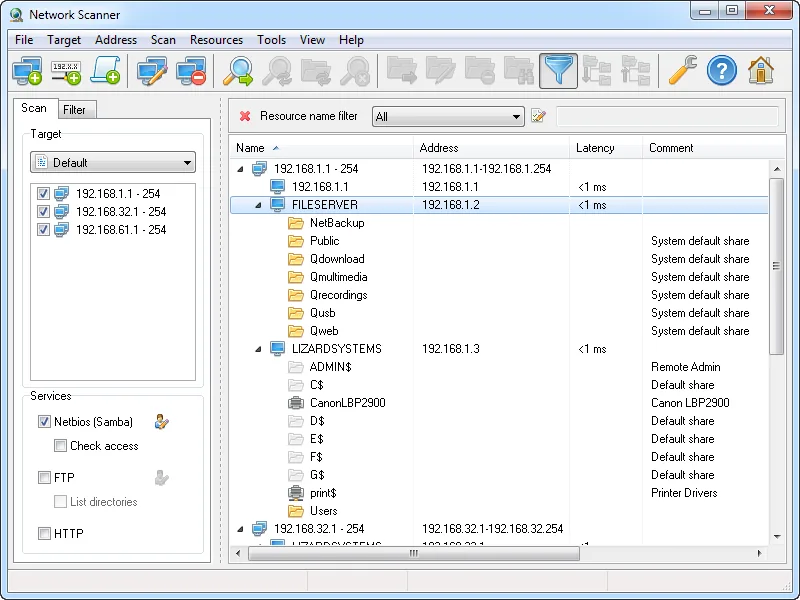
After the file server migration, someone asks a sharp question: “Are there still shares out there with write access for everyone?” Old departmental folders on retired desktops, a SCANS$ share on a multifunction printer, an FTP service on a NAS nobody remembers enabling. A liveness sweep won’t answer that; you need a tool that walks the address space, finds the shares, and tells you what a given account can do with each one. That narrower job — resources and rights rather than ports — is where LizardSystems Network Scanner is aimed.
Use with authorization only: scan only networks you own or have explicit permission to scan.
What LizardSystems Network Scanner does
The vendor describes Network Scanner as an “IP scanner tool for analyzing networks.” Targets can be single addresses, host names or whole ranges, and a shorthand like 192.168.1-2,5,20,25-27.1-254 packs several ranges into one line; the scan then runs across multiple threads. For each computer it reports:
- Online/offline state, checked by ping and, optionally, by connecting to ports you specify. The vendor frames this as a status check, not a general port scanner.
- Computer name from NetBIOS or the domain.
- Shared resources, including “system and hidden NetBIOS (Samba) shared resources along with FTP and web resources.”
- Access rights — read and write — for the current user or for any user you specify.
- Latency, plus first-scan and last-scan timestamps.
From the results tree you can open a share in Explorer or a browser, map it as a network drive, or launch a connection as a web, FTP, Telnet or RDP server. Configurable Network Tools and Administrative Tools menus add external commands; the 21.02 release added remote shutdown and send-message tools. Results can be filtered by resource type, access rights and name, saved within the program, and exported to HTML, TXT or XML. The vendor states no administrator rights are needed to scan, and claims scanning speeds of “thousands of computers per minute.”
Where it’s strong: a share-and-permissions audit in one pass
The access-rights check is the distinguishing feature. Scan a range as a low-privilege test account, filter for write access, and export to HTML: you now have a list of every share that account can modify. That is concrete, shareable evidence for a clean-up task or a compliance question, and it is not something ping sweepers or port scanners produce.
- Hidden shares included, so administrative shares and
$-suffixed folders don’t slip through. - Mixed resource types — SMB, FTP, HTTP — in one tree.
- Per-user checks: the vendor says you can test rights for “any specified user,” not only the account running the scan.
- Low requirements: 1 GHz CPU, 512 MB RAM and 50 MB of disk space, according to the vendor.
Where it falls short, and who should skip it
The biggest caveat is age. Version 21.07, dated July 7, 2021, is still the newest build as we write this, so the tool has gone more than five years without a release. Supported systems, per the vendor, span Windows 7 and Server 2008 R2 up to Windows 10 and Server 2016. Windows 11 and Server 2019, 2022 and 2025 appear nowhere on that list; the program might work there, but nobody has confirmed it, and SMB behaviour on newer Windows builds (SMB1 removal, stricter guest access) can affect what any share-enumeration tool sees. The release is a 32-bit program.
It is Windows-only. There is no macOS or Linux build, and no command-line interface is documented, which limits scripting.
The vendor does not claim MAC address detection, SNMP, IPv6 scanning, Wake-on-LAN or CSV export for this product. If you need a cross-platform liveness-and-ports sweep, Angry IP Scanner is a better fit. If you need a real permissions audit with NTFS ACL depth and reporting history, a dedicated file-server auditing product will go further than a share-level check.
Who it suits
- Windows admins in small and mid-size environments who want a quick inventory of shares and their effective access.
- IT staff cleaning up after migrations, office moves or decommissioned file servers.
- Home users on a personal licence who want to see what their machines share with each other.
Licensing and cost
At the time of writing, the vendor’s pricing page lists two options. A Personal License is free for non-commercial use only. A Business License is US$79.95 per machine: perpetual, bundling a year of updates at no charge plus support by email or ticket. According to the FAQ, every machine you put it on requires a licence of its own. The vendor also mentions volume and site licensing on request. The FAQ describes an evaluation period for unregistered copies with nag screens and no functional limits on one computer, and the company page mentions a 30-day evaluation for every product; how that interacts with the free personal licence is not spelled out, so read the vendor’s current licence page before deploying at work.
How it compares
Against Angry IP Scanner, this tool trades cross-platform support and port columns for share discovery and rights checks. For a process-level view on one Windows host, TCPView complements it. Both scanners sit in the host and connection checks category; if the next question after “which hosts are online?” is “why is this one slow?”, continue with PingPlotter or the guide to checking which hosts came back after an outage.
Getting it safely
Get Network Scanner only from lizardsystems.com. The vendor publishes a SHA-256 hash for the 21.07 package on its product and release pages; compare it with Get-FileHash -Algorithm SHA256 <file> in PowerShell before running. Since 4.4.221 the package offers a non-admin install mode. Avoid third-party mirrors, which are a common source of bundled adware for older Windows utilities. Our where to get it page lists the same checks for every product, and methodology explains why vendor-stated features are marked as such.
FAQ
Does it work on Windows 11?
The vendor does not list Windows 11 as supported; its list ends at Windows 10 and Server 2016. Test it on a non-critical machine before relying on it.
Can it scan for open ports like a port scanner?
Not in general. It can use specified ports to decide whether a computer is online, but the vendor positions it as a resource and share scanner, not a port scanner.
Is the personal licence usable at work?
No. The vendor restricts the free licence to non-commercial use; business use requires the per-machine Business License.
Which export formats are supported?
HTML, TXT and XML, according to the vendor. CSV is not listed.